Kirby CMS vs WordPress: The Honest Comparison
Kirby CMS vs WordPress: where WordPress hits its limits, why Kirby wins on security and maintainability, and when switching makes sense.
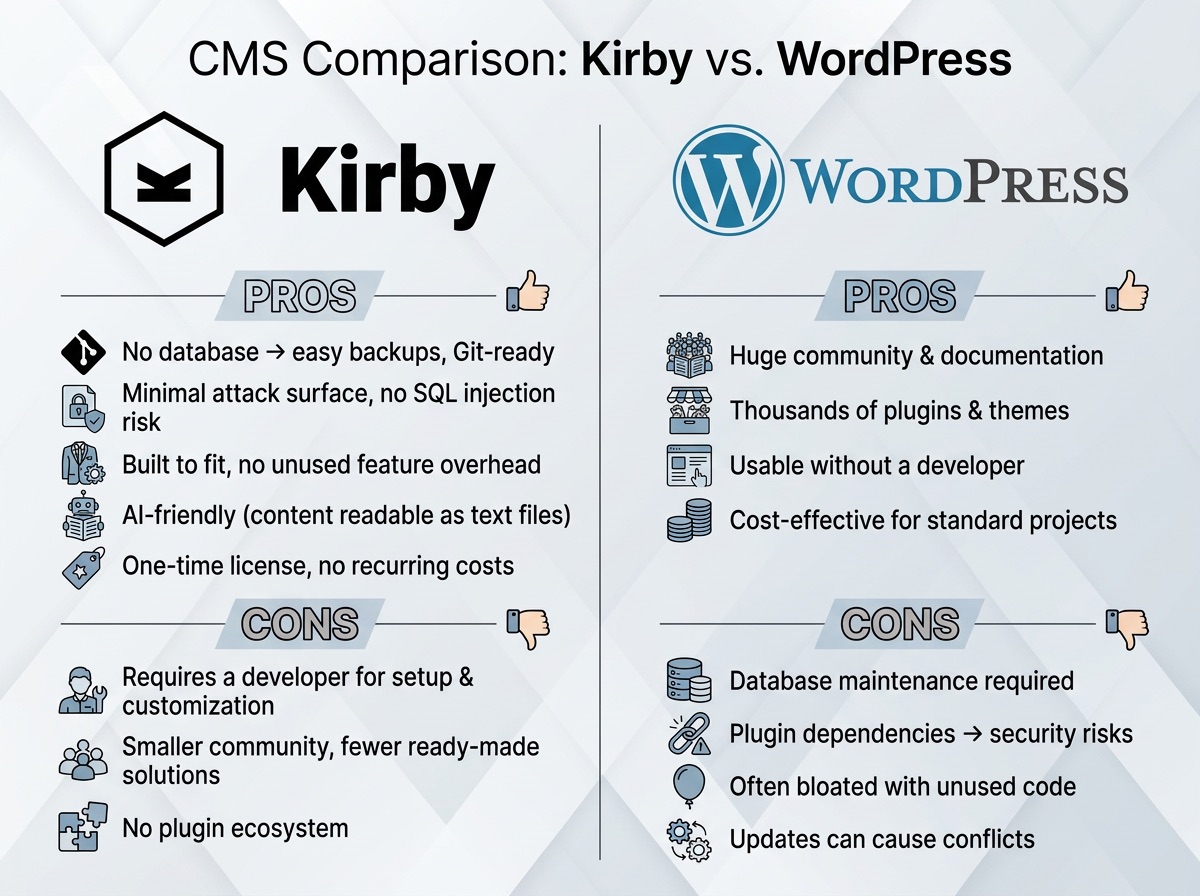
WordPress runs on just under 42 percent of all websites worldwide. Kirby CMS, on the other hand, is barely known. That makes the comparison interesting, because widely used and best suited are not always the same thing.
WordPress and Kirby CMS in Brief
WordPress has been around since 2003 and now powers just under 42 percent of all websites worldwide. The system is built on a database, a structured data store that the website queries on every page load. Ready-made themes handle the design, and thousands of plugins extend the functionality. For blogs, magazines, and simple business websites, this is a proven path with a large community and many off-the-shelf solutions.
Kirby CMS comes from Munich and takes a different approach. Content is not stored in a database but saved as plain text files directly on the server. There are no pre-built themes and no default layout. Every project is built individually, based on actual requirements. This makes Kirby smaller, more focused, and more controllable than WordPress.
| WordPress | Kirby CMS | |
|---|---|---|
| Content storage | Database | Plain text files |
| Common attack surface | Plugins, SQL injection via database queries | No database by default, minimal setup |
| Performance | Needs caching plugins for good scores | Static or server-rendered by default |
| Pricing | Free core, but themes and plugins add up | 99 € one-time Basic license (commercial use) |
| Editor experience | Feature-rich, often busy dashboard | Panel tailored to the project, only needed fields |
The Advantages of Kirby CMS over WordPress
No Database, Content as Text Files
In Kirby, every page lives as a readable file on the server. That sounds like a technical detail, but it has real consequences day to day.
Backups need no special plugin or database export tool. You copy the project folder and you're done. Version control, meaning tracking who changed what and when, can be set up with Git. Git is a standard tool in software development that every developer already knows and uses. In practice, this means you can roll back content changes the same way you would roll back code changes.
Particularly interesting for modern setups: text files can be read and structured directly by a language model, an AI system like ChatGPT or Claude. This means content can be created and filled in faster without manual work in the backend. With a classic database architecture, that would require additional tooling and significantly more effort.
No Plugin Chaos, More Security
The most common cause of hacked WordPress sites is outdated or poorly maintained plugins. If you have three plugins for forms, two for SEO, and one for the cookie banner, you are also maintaining six potential attack vectors. Every plugin that goes unmaintained by its author becomes a liability.
Kirby does not need a database by default, which removes a common attack path: SQL injection. SQL injection is a common method where attackers inject malicious code through database queries. In a typical Kirby setup, that path simply does not exist. And because everything is built from scratch rather than assembled from plugins, the codebase stays lean and auditable.
The setup stays minimal: only what the project actually needs. This makes maintenance more predictable in the long run and keeps the attack surface small.
Performance Without Extra Effort
WordPress loads every page by querying a database and assembling the HTML at runtime. By default, this happens on every request. Most WordPress sites compensate with caching plugins, tools that pre-generate pages and store them temporarily. That works, but it adds yet another layer of setup, configuration, and maintenance.
Kirby's flat-file architecture means no database query on page load. Combined with a headless setup and a modern frontend framework like Nuxt, the result is a statically generated or server-rendered website that scores well on Core Web Vitals without needing a separate caching layer. Faster load times are not an afterthought: they are a natural outcome of the architecture.
This matters more than ever. Page speed directly affects search engine rankings, bounce rates, and user satisfaction. Reaching good Lighthouse scores with a stock WordPress site often requires careful plugin selection and ongoing tuning. With a Kirby headless setup, that baseline is simply built in.
The Editor Experience
Kirby's Panel, the backend interface for editors, is clean and purpose-built. It shows only the fields and content types that the project actually requires. There are no cluttered sidebars, no plugin settings to ignore, no menu items unrelated to the current task.
WordPress's admin dashboard is feature-rich, which also means it is busy. Editors who only need to write a blog post or update a landing page often find themselves navigating menus that were never designed for them. Page builders like Elementor or Divi add flexibility but also complexity, and they introduce their own performance and compatibility issues on top of the core system.
In practice, training editors on a custom Kirby Panel takes less time than onboarding them to a cluttered WordPress backend, even though Kirby is the less familiar system.
What WordPress Actually Costs
WordPress is free to download. That is often where the "free" ends.
A typical business website on WordPress accumulates costs across several categories: a premium theme, multiple paid plugins for SEO, forms, backups, security scanning, and performance, plus managed WordPress hosting at the right specification level. And whenever something breaks (a plugin conflict after an update, a hacked site, a layout issue), a developer needs to step in and fix it. These unplanned interventions add up.
For smaller commercial projects, Kirby costs 99 euros as a one-time Basic license per site. Larger companies need an Enterprise license. Development takes longer upfront because everything is built to specification rather than assembled from existing pieces. But the result is a project with no recurring plugin licenses, minimal hosting requirements, and far fewer moving parts that can fail.
For clients who maintain their website over several years, the total cost of ownership is often lower with Kirby, not despite the custom development, but because of it.
Kirby CMS or WordPress: Who Should Consider Switching?
Being fair to both systems without being dishonest is actually straightforward.
WordPress makes sense when a standardized solution is sufficient, when community resources and plugin selection matter, or when there is no budget for custom development. If you already run a well-functioning WordPress site with no urgent problems, there is no need to switch just because Kirby exists. The ecosystem is large and the knowledge base is deep.
Kirby CMS is worth considering when the project needs a tailored content structure, when long-term security and easy maintainability matter more than a quick off-the-shelf solution, or when the website needs to grow alongside the business without hitting technical limits at every turn. It is also a strong fit for projects where content will be processed, generated, or fed into external systems, because plain text files are the most portable format there is.
In my projects, I typically use Kirby as a so-called headless backend. Headless means: Kirby manages the content in the background while Nuxt builds the visible frontend from it. This combination produces websites that load fast, are individually designed, and can be maintained by editors without any developer knowledge. The content model is defined by the project requirements, not by what a theme or plugin happens to support. How this workflow looks in practice is covered in the post Headless Workflow with Kirby CMS and Nuxt.
If this sparked your curiosity: drop me a line and tell me what your project is about. A brief exchange is usually enough to see whether Kirby CMS headless with Nuxt is the right combination for your case.
mail@eugen.workThis article was drafted and translated with the assistance of AI.