Webflow or Custom Code: What Really Matters
Webflow is fast, visual, and convenient. But for cost, ownership, performance, and long-term growth, businesses should look closely.
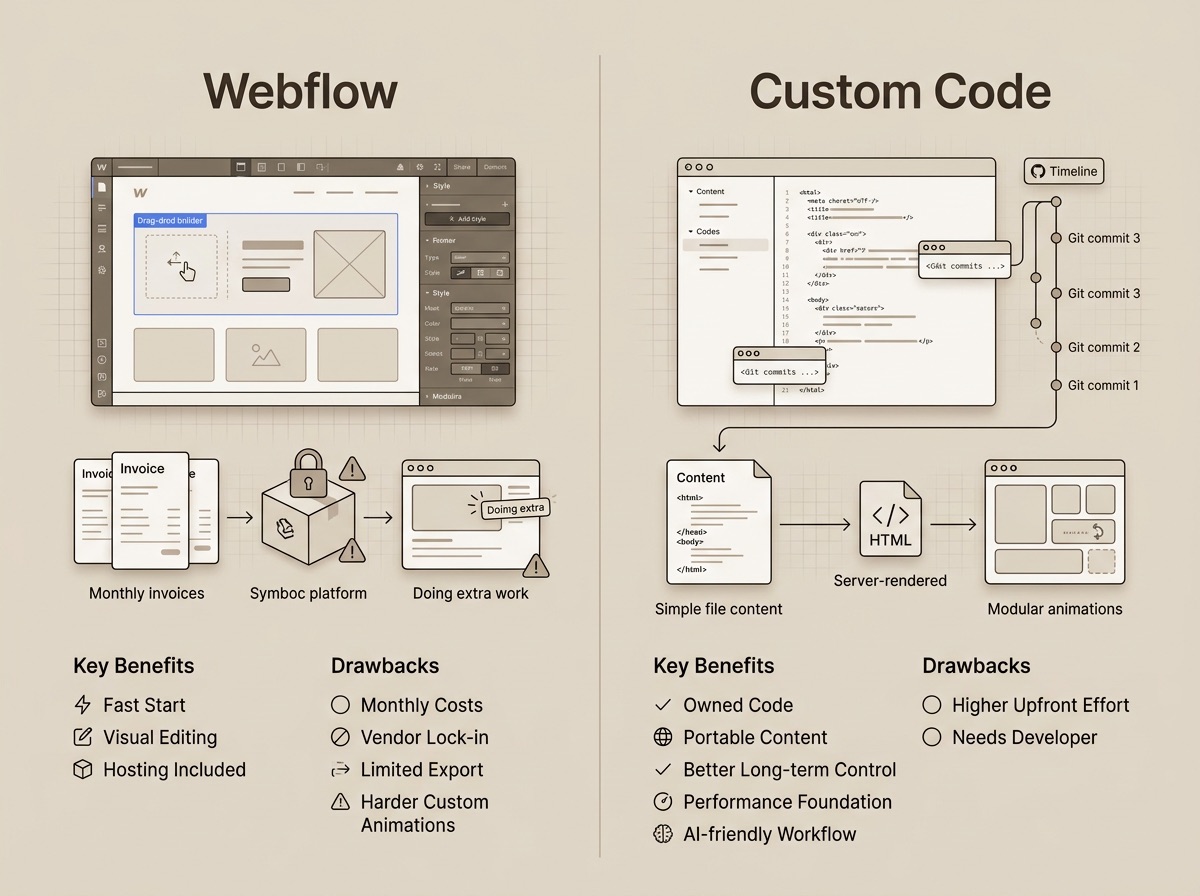
Webflow is everywhere. YouTube tutorials, LinkedIn posts, agency websites: the message is usually the same. Professional design, no developer needed, live in a few weeks.
That is true as long as the project stays simple.
If you are seriously considering building a business website on Webflow, it is worth asking a few questions before the first invoice arrives. Not because Webflow is bad. Good tools still have limits when they are used for the wrong kind of job.
What Webflow Does Well
Webflow is a visual website builder with a built-in CMS, hosting, and design tool. Designers build directly in the browser, see the result immediately, and do not need to set up a local project, install packages, or configure a server.
For many use cases, that is useful.
A campaign page that will run for three months. A prototype for a new offer. A smaller marketing website that a team wants to adjust on its own. In those cases, Webflow can be a sensible choice. You get something online quickly, it can look polished, and infrastructure does not become part of the conversation.
The templates are often solid too. If you start with a clearly limited website and do not need an unusual content structure, Webflow can get you moving quickly. That is not a small advantage. Early speed sometimes matters more than perfect architecture.
The issue is that a business website rarely stays at the beginning. It grows. New languages are added, new landing pages, structured content, animations, integrations, SEO requirements, tracking, maybe different hosting, maybe a redesign. At that point, you find out whether the tool grows with the website or was only pleasant at the start.
The Invoice Nobody Shows at the Beginning
Webflow looks affordable at first glance. No development setup, no separate hosting contract, no maintenance system. One plan, one interface, done.
The recurring costs still matter. After Webflow's 2026 plan and pricing changes, a CMS-capable site plan sits around 25 dollars per month when billed annually. Simpler static sites can use cheaper plans, but once a CMS is needed, you are in a higher tier.
Multilingual support comes on top. Webflow Localization is a separate add-on and is billed per additional locale. The Essential plan sits around 9 dollars per month per secondary language, Advanced around 29 dollars per month. The primary language is included — only additional locales are charged. For a German and English site, that means roughly 9 dollars per month extra on the Essential plan.
A typical small business setup with a CMS and two languages can quickly land at around 34 dollars per month. That is roughly 408 dollars per year and about 1,224 dollars over three years, without additional workspace costs for team access.
For comparison: a small VPS for a performant business website often costs around 10 to 15 dollars per month. Kirby CMS costs 99 euros once per site for smaller commercial projects. Over three years, that is roughly 540 dollars in hosting plus the one-time Kirby license.
| Webflow (CMS + 2 languages) | Custom (VPS + Kirby) | |
|---|---|---|
| Per month | ~$34 | ~$10 – 15 |
| Per year | ~$408 | ~$120 – 180 |
| Over 3 years | ~$1,224 | ~$540, including the one-time Kirby license |
Of course, this calculation does not replace development costs. A custom website costs more upfront than a Webflow template. But the ongoing cost structure is different. With Webflow, you keep renting the platform, CMS, hosting, and add-ons. With a custom setup, you mainly pay for developing a system that belongs to you.
The cheap no-code solution is not automatically cheaper over several years. It just feels smaller at the start.
Who Owns Your Website?
That sounds more dramatic than intended. Of course your design, brand, and content are yours. But the technical form of your website lives inside Webflow's proprietary platform.
Webflow allows code export. That sounds reassuring until you look closer. What gets exported is essentially static HTML, CSS, JavaScript, and assets. CMS content, forms, interactions, and e-commerce features do not come along completely, a common criticism of Webflow for growing business websites. What remains is rarely a clean foundation for further development.
In practice, leaving Webflow usually means rebuilding.
That is not unusual for website builders. They do not just sell code; they sell an environment. That is convenient as long as you stay. It becomes expensive once you want to leave.
Pricing changes make this point more tangible. If a platform restructures plans or raises prices, your options as a customer are limited. Pay, migrate, or rebuild. This is not a Webflow-specific problem; it is the basic principle of closed platforms. You are renting. Nicely painted, perhaps, but still renting.
With a setup based on Nuxt and Kirby CMS, this looks different. Nuxt builds the visible frontend. Kirby manages the content in the background. Content lives as plain text files on your own server. It can be versioned, backed up, moved, and tracked with Git. If you want to change hosting provider, you are not breaking out of a platform contract; you are moving a project folder.
That is less flashy than a visual editor. Long term, it is a big difference.
Performance: Good for Simple Sites, Limited as Projects Grow
Webflow can build fast websites. Simple pages without much logic, without heavy media, and without complex interactions can reach respectable scores.
The limits tend to show up once projects grow. Many CMS collections, animations, embedded tools, tracking scripts, and dynamic content increase the work the browser has to do. Core Web Vitals, Google's metrics for loading speed, visual stability, and responsiveness, react sensitively to that. A similar difference is described in this comparison of Webflow and custom code.
This is not just a technical hobby topic. Page speed affects search rankings, bounce rates, and conversion. If a page takes several seconds to respond properly, the visitor is not impressed by the tool choice. They are gone.
With Nuxt, a page can be server-rendered or statically generated. Put simply: the browser receives finished HTML instead of having to assemble the page itself. Kirby delivers the content, Nuxt puts it together cleanly, and the result is designed for good loading performance from the start.
That does not mean every Nuxt site is automatically fast. You can build nonsense with any tool; the internet proves this daily. But the architecture creates a stronger baseline. Performance is not a plugin added at the end or a checklist just before launch. It is part of the build.
Animations: Where Webflow Starts Nicely and Then Gets Tight
Webflow Interactions are good for standard animations. Fade-ins, hover effects, simple scroll movements, a little motion when the page loads. That is what the tool is built for, and it works well there.
More complex animation is a different category. GSAP ScrollTrigger, SplitText, path animations, precisely timed sequences, animations that interact with data or layout state: eventually, you end up with custom code.
Custom code in Webflow often means copying snippets into text fields. It works, but it is not a particularly pleasant place to develop demanding animations. No real IDE feedback, no type safety, no clean Git diff, no normal review process. Errors sometimes announce themselves with all the elegance of a locked mailbox.
That is not an accusation against Webflow. It was not built to replace a full development environment.
In a Nuxt project, animation is part of the codebase. GSAP components can be built modularly, tested, reused, and versioned cleanly. If something changes later, the Git diff shows exactly what happened. That sounds dry, but dry things are often what save a project six months later.
The AI Advantage of Real Code
One point is often missed in the Webflow discussion: AI tools work much better with code projects than with closed visual editors.
In Webflow, a large part of the website lives inside an interface that an AI agent cannot meaningfully access directly. It can explain, plan, or suggest snippets. But it cannot reliably move through the project, refactor components, adjust content models, inspect Git diffs, and make changes directly in the codebase.
With Nuxt and Kirby, the structure lives in files. Components, blueprints, content, translations, routes, metadata: everything is readable. AI can work there like a very fast assistant, as long as a developer guides the decisions and checks the results.
Kirby reinforces this advantage because content is stored as text files. Multilingual content, structured landing pages, or new blog posts can be created and edited directly in the project. No database access, no export, no import script.
This does not replace strategy or good judgment. But it saves time on the parts that would otherwise be a lot of manual work. For businesses that publish regularly or need many similar pages, that is a real advantage.
When Webflow Is Still the Right Choice
Webflow makes sense when the project is clearly limited:
- A campaign page with a short lifespan
- An MVP test where speed matters most
- A marketing team that wants to make small layout changes without involving a developer
- A website without multilingual content, a complex content structure, or special integrations
If the budget for custom development is not there yet, Webflow can also be a good interim step. A working simple website is better than a perfect concept that never goes live.
If you need a digital business card and do not plan to expand it much, you do not need to order custom code on principle. That would be about as reasonable as using a cargo bike to get from the sofa to the fridge.
The question is not whether Webflow is good or bad. The question is whether it fits what the website needs to do over the next few years.
What I Build Instead
In my projects, I usually use Nuxt as the frontend and Kirby CMS as the headless backend.
Nuxt gives the project a clear structure. Pages, components, data fetching, and server logic have defined places. That makes development faster, maintenance easier, and future changes more predictable. Depending on the project, Nuxt can statically generate pages or render them on the server. Both are strong foundations for performance and SEO.
Kirby handles the content. The panel is tailored to the project so editors only see the fields they actually need. No plugin landscape, no theme builder, no required database. Content lives as text files in the project, making it portable, versionable, and AI-friendly.
For animations, I use GSAP. Not because every website needs to feel like cinema, but because good motion can guide attention. A clean scroll effect, a precise sequence, a small interaction in the right place: it feels premium when it serves the content. And it stays maintainable when it is part of the codebase.
I described this workflow in more detail in Headless Workflow with Kirby CMS and Nuxt. If you are more interested in the CMS comparison, Kirby CMS vs WordPress is the better starting point.
In the end, this is not about talking Webflow down. For certain projects, it is a good tool. But if a website needs to grow over time, stay fast, remain easy to maintain, and run independently, custom development becomes worthwhile earlier than many people expect.
If you are not sure whether Webflow is really the right fit for your project, or whether your existing Webflow site is starting to hit its limits, send me a short message. A brief conversation is usually enough to assess it.
mail@eugen.workThis article was drafted and translated with the assistance of AI.